The Helpify System
A lead you paid for isn't a patient yet.
Your practice doesn't make money until the patient comes in for a consultation and starts treatment. That's why we follow up so the patient from your ad makes it to the chair. The six steps below show what your practice gets.


Step 1. A campaign for one service
We run ads for the service where your dentist has open slots.
We run Facebook and Instagram ads for one service, chosen based on your schedule. That way, patients from the campaign go to the dentist who has open slots, on the days that are open. We start with one, because a budget split across five services isn't enough for any of them.
For that service, we prepare four messages. We describe them below, under the four stages of patient readiness.
Who does it: Helpify runs the campaign. You choose the service with us.
Campaign: implants
FacebookInstagram
Open slots: Tuesday and Thursday
Step 2. Ad videos
You get 6 ad videos, filmed at your practice.
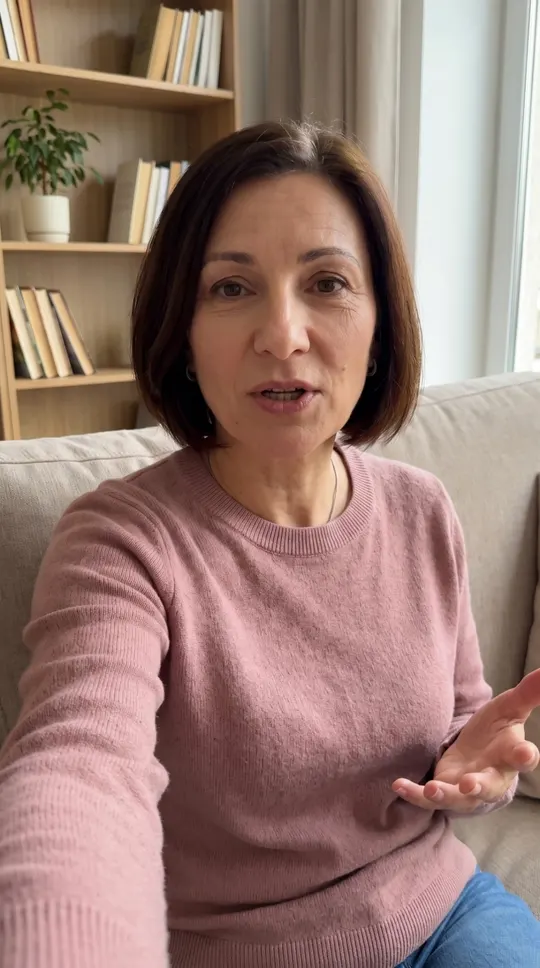
A creator, a person who films videos for ads, comes to your practice and films on a phone. Before that, you pick the creator from our shortlist and approve the scripts we write, so you know who will say what about your practice. You start with 6 videos, plus image ads.
It looks like an everyday phone video, and the patient sees someone like them in it.
You approve every ad before it runs.
Who does it: The patient watches. A creator films the videos, we write the scripts, and you approve every ad.
Newshore Dental · Sponsored
Implants: what to expect, timing, and cost
Learn moreStep 3. Service page with a form
Your front desk calls someone who already knows the price and what to expect.
The ad leads to a page for one service at your practice, where the patient finds:
- the price or a price range,
- what to expect and how long it takes,
- pain and recovery,
- payment plans,
- the dentist,
- questions and answers,
- your practice's address.
The "Request a consultation" button stays in view as the patient scrolls and opens a form. The patient enters their full name, email, and phone number.
Who does it: The patient reads and fills out the form. Helpify builds the page.
NewshoreDental
Request a consultationReplace a missing tooth and stop thinking about it.
Full name
Phone number
Have the front desk call meStep 4. Your front desk calls the patient
Your front desk calls the patient and gets up to three reminders about every lead.
Confirmation and a text to your front desk.
After filling out the form, the patient gets a text and an email confirming their request. The text goes out in your practice's name and is signed by your practice, so the patient sees your name in it, not Helpify's.
Your front desk gets a text with the patient's first name, phone number, and service, so they know what the call is about before they dial.
Evening and weekend leads.
The patient gets a confirmation then too, and the reminders for your front desk start when your practice opens.
To the patient
Hi Emily, thanks for your request about dental implants. Our front desk will call you to schedule a consultation. Newshore Dental
To the front desk
New lead: Emily K., (555) ***-4567, implants. Please call the patient.
Helpify doesn't call patients, and no automated system does.
Reminders about the lead.
Your front desk gets a text when the lead comes in. If they don't mark the call result in your Helpify dashboard, they get another text after 15 minutes and a last one after an hour. That way, a lead you paid for doesn't go without a call.
Call result.
After the call, your front desk marks one of three results in the dashboard: booked, no answer, or not interested. For a booked appointment, they enter the day and time. Once a result is marked, the reminders about that lead stop.
When your front desk marks "No answer."
The patient gets a text saying the practice called and will call again. Your front desk gets a reminder for a second attempt after 2 hours and for a third on the next business day. That makes three contact attempts in total, so one missed call doesn't close the lead. After a third failed attempt, the lead closes as "couldn't reach," and the patient gets a last text with the practice's phone number.
To the patient
Hi Emily, we called about your implant consultation. We'll try you again, or you can call our front desk. Newshore Dental
Front desk training.
Someone who comes in from an ad doesn't know your practice yet. So your front desk gets a one-page call script that covers:
- the opening line,
- the goal of the call: book a consultation,
- what to say when the patient asks about price,
- what to say to "I need to think about it,"
- which days to book campaign patients on.
The training takes 30 minutes, and in that time we also practice marking the result in the dashboard.
Who does it: Your front desk calls. The system sends the texts and reminders.
- Opening line
- Goal: book a consultation
- When the patient asks about price
- When the patient says "I need to think about it"
- Which days to book campaign patients on
- Booked
- No answer
- Not interested
Step 5. Before the appointment and after a no-show
A booked patient gets an appointment reminder. When your front desk marks a no-show, the system reminds them to reschedule.
Once booked, the patient gets a text and an email with the day and time, then a reminder before the visit so they don't forget.
A patient who missed one appointment can still become your patient. So when your front desk marks the no-show in the dashboard, the patient gets a text, and your front desk gets a reminder to call and reschedule.
Who does it: The system. Your front desk marks the no-show.
Hi Emily, this is a reminder about your implant consultation tomorrow. See you then. Newshore Dental
After a no-showHi Emily, we missed you today. We'll call you to set a new time for your consultation. Newshore Dental
Before the visit
Hi Emily, this is a reminder about your implant consultation tomorrow. See you then. Newshore Dental
After a no-show
Hi Emily, we missed you today. We'll call you to set a new time for your consultation. Newshore Dental
Step 6. Dashboard
You see who left their number, who's booked, and who showed up.
The dashboard shows four numbers:
- Leads:
- how many people filled out the form on the service page.
- Booked appointments:
- how many of them your front desk booked.
- Patients who showed up:
- how many of those patients came in.
- Ad spend:
- what you paid for ads on Facebook and Instagram, not including Helpify's fees.
Every lead has one of six statuses: new lead, call back, appointment booked, showed up, no-show, closed.
You can check the numbers any day and see whether your ads are paying off.
Who does it: The system counts. Your front desk marks the no-show.
- Leads
- 6
- Booked appointments
- 3
- Patients who showed up
- 1
- Ad spend
- Emily K.Showed up
- Mike W.Appointment booked
- Sarah M.Call back
- David S.New lead
- Brian D.No-show
- John L.Closed
So for one service we prepare four different messages, one for each stage of the decision. That way the ads also speak to people who are just starting to think about treatment.
Problem.
The patient has a problem but isn't thinking about treatment yet, so the ad names the problem.
Solution.
The patient knows it can be treated and wants to know if it hurts, how long it takes, and what it costs. The ad answers those questions.
Choosing a practice.
The patient has decided on the treatment and is comparing practices. So the ad shows what treatment looks like at your practice: the steps, the dentist, the price or payment plans.
Decision.
The patient knows your practice but keeps putting off the visit, so the ad invites them to a consultation.
Videos with the creator speak to patients at the first three stages, and image ads speak to patients at the last two.
We turn the ads on last, once the service page, the videos, and your front desk are ready. That way your ad budget doesn't go to leads your front desk isn't prepared for yet.
Agreement signed
What happens
- Service page
- Videos
- Front desk training
What you pay
You pay once for the campaign build: the service page, the ad videos, and front desk training.
Ads go live
no later than 8 weeks. If the delay is on your side, the deadline moves.
After that, you pay a flat monthly fee for campaign management, and it doesn't start until the day your ads go live.
You pay your ad budget separately, straight to Meta.
following months
Your ads go live no later than 8 weeks after you sign. If they don't and it's our fault, we refund the build fee.
I'll show you the numbers along with a plan for your practice.
Can the Helpify System run alongside our agency?
You don't have to drop your current agency. The Helpify System can run alongside it, because we run a campaign for one service.
Does an automated system call my patients?
No. Your front desk calls the patient. The texts, emails, and reminders are automated.
What happens to a lead that comes in at night or on a weekend?
The patient gets a confirmation then too, and the reminders for your front desk start when your practice opens.
Does it connect to our scheduling software?
No. Your front desk enters the appointment in your practice's schedule the way they do now, and marks the call result and the appointment time in the dashboard. That means two entries.
What if the front desk calls but doesn't mark the result?
Then the system doesn't know about the call and sends another reminder. That's why we practice marking the result with your team during front desk training.
Can I advertise several services at once?
We start with one service and add a second once the first has a steady flow of leads. Each service is a separate campaign with its own fees and its own service page.
On the call, I'll show you where your practice may be losing patients between the ad and the chair. You don't need to prepare anything.
You pay once for the campaign build, and the monthly fee doesn't start until the day your ads go live. If they aren't live within 8 weeks and it's our fault, we refund the build fee.
Book a callFree 30-minute call with the founder, online.